
On-device: fast, private, offline
The standard fix runs entirely on your iPhone. Nothing is uploaded, it works without a connection, and there's no account to create.
Slow mo flicker fix
Slow-mo shot under LED or fluorescent lights can come out pulsing, strobing, or striped with dark bands. Deflicker evens out the light frame by frame. Fix clips privately on your iPhone, or send the toughest ones to Fusion, our strongest flicker removal.
Free download for iPhone. The on-device fix is free to try, with a watermark. Pricing
Why Deflicker
Flicker is a brightness problem, so Deflicker corrects brightness and nothing else. Your framing, motion, resolution and sound stay exactly as you shot them.
The standard fix runs entirely on your iPhone. Nothing is uploaded, it works without a connection, and there's no account to create.
For the hardest clips, Fusion tracks every pixel across frames and rebuilds the light, running in the cloud on our GPUs. It's our strongest fix.
Your clip keeps its resolution and its audio. Deflicker changes only what the flicker changed: the brightness of each frame.
Check the result before you save: drag the divider across the playing video, or hold to see the original full-frame.

Try it
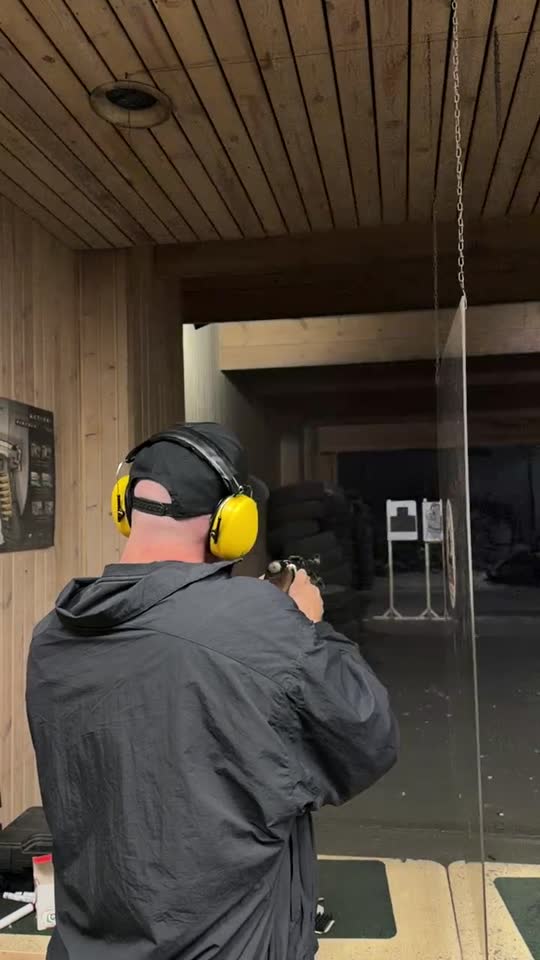
This is one frame from the clip above, before and after. The original caught the LEDs at a dim point in their cycle, so the range behind the shooter sinks into shadow. In the fixed version every frame sits at the same, steady level.
In the app you compare the full video the same way, with both versions playing in sync, before anything is saved to Photos.
How it works
No editing timeline and no export settings to learn. Deflicker reads the clip straight from Photos.
Tap Choose a video and pick it from Photos: 240 fps or 120 fps slow-mo, or a regular video filmed under artificial light.
Medium strength and the Smart method suit most clips. Go Light to keep real lighting changes, Strong for heavy flicker, or switch the engine to Fusion for deep or patchy flicker.
Drag across the preview to compare before and after, then save the fixed video to Photos as a new clip.
Pricing
The download is free and so is the on-device fix, with a watermark. Deflicker Pro removes the watermark and includes Fusion clips.
Free
$0
Deflicker Pro, Yearly
$29.99 / year
Deflicker Pro, Weekly
$4.99 / week
Need more Fusion? Add 10 extra Fusion clips for $4.99 at any time.
One Fusion clip covers up to 1,000 frames of 1080p video, about 4 seconds of 240 fps slow motion; longer or higher-resolution videos use more. Prices are in US dollars; the App Store shows your local price. Subscriptions renew automatically until you cancel in Settings.
FAQ
Most indoor lights don't shine steadily. They pulse at twice the mains frequency: 100 times a second on 50 Hz power and 120 times a second on 60 Hz power. At normal frame rates the camera exposes each frame long enough to average those pulses out. At 120 or 240 fps each exposure is shorter than a pulse, so consecutive frames catch the light at different points in its cycle, and slow playback stretches the difference into visible flicker. Read the full explanation.
Yes, in most cases. Flicker is a change in brightness from frame to frame, so software can measure it and even it out without a reshoot. That is what Deflicker does. The limit is detail that was never recorded: areas blown out to white or crushed to black in some frames can't be restored, so very deep flicker may leave slight unevenness. Fusion handles deep flicker best.
Yes. Deflicker works with 240 fps and 120 fps slow-motion clips as well as regular videos. 240 fps footage usually flickers the most, because each frame is exposed for 1/240 of a second or less, shorter than a single pulse of the light.
Not with the on-device fix: it runs entirely on your iPhone and nothing leaves the phone. Fusion runs on our GPUs, so it uploads only the clip you choose to send to Fusion, and that clip is deleted within 24 hours. There is no account and no sign-in.
Fusion is counted in clips. One Fusion clip covers up to 1,000 frames of 1080p video, about 4 seconds of 240 fps slow motion. Longer or higher-resolution videos use more than one, and the app shows how many before you start. Pro Yearly includes 15 Fusion clips a month, Pro Weekly includes 5 a week, and you can add 10 extra Fusion clips for $4.99.
The on-device engine measures brightness across the frame, area by area, and smooths out the pulsing. It is quick, private and right for most clips. Fusion is heavier: it tracks every pixel across frames and rebuilds the light, which helps with deep LED and fluorescent flicker and with parts of the frame that flicker out of step. It runs in the cloud and takes longer.
Subscriptions are handled by Apple. On your iPhone, open Settings, tap your name, then Subscriptions, choose Deflicker Pro and tap Cancel Subscription. Cancel at least 24 hours before the renewal date to avoid the next charge. You keep Pro until the end of the period you have paid for.
Deflicker is an iPhone app and needs iOS 17 or later. It works on videos in your Photos library, whether you filmed them on that iPhone or saved them there from somewhere else.
Guides
Plain-English guides to why slow-motion video flickers, how to fix LED and fluorescent flicker, and how to avoid it next time.
A step-by-step walkthrough for clips you have already shot, with the right settings for pulsing, banding and patchy flicker.
Mains power, 100 and 120 Hz light pulses, aliasing and rolling shutter, explained in plain English.
Pulsing, banding, regional and color flicker from LED and fluorescent lights, and how to remove each kind.
Lights, frame rates and flicker-safe shutter speeds for 50 Hz and 60 Hz countries, plus a two-minute test routine.
Flicker Free, DaVinci Resolve Studio, ffmpeg and an iPhone app compared honestly, with commands and settings.

Download Deflicker, pick the video, and compare the result before anything is saved.